Problem:
My driver CD for the USB-Serial converter has gone AWOL, so I had to look for the appropriate file. My adapter is a generic “no-name” (PL-2303 based) as can be seen in the photos:
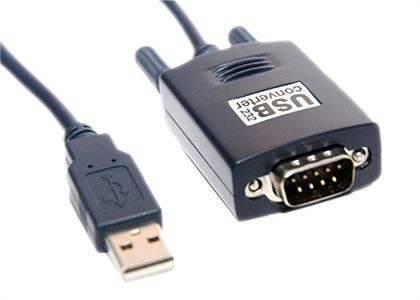
It’s a Prolific chip, so this site should help. I remember not having any problems with the default driver on my desktop (Windows XP). However, this time I had to use the adapter with my netbook (also Windows XP), and it didn’t work with the device manager stating:
This device cannot start. (Code 10)
Solution:
According to this thread, there’s another version of the driver available. I’m not sure if the one mentioned there is the same as PL2303_Prolific_GPS_1013, though it looks similar. But I’ve tried the GPS version from Prolific, and it did work. My desktop had no problems with the standard version though, so it’s a bit of trial and error method.


hello,
i have same problem with this equipment and detected in COM1 but i can use :-(
can you help me ?
I’m afraid if none of the drivers work, it can be problematic to diagnose remotely. Maybe try using it on another station and see if the problem persists?
hi
driver for chip:
http://www.prolific.com.tw/eng/downloads.asp?ID=31
http://www.usglobalsat.com/download/546/win_drivers.zip
Hi, The mentioned driver solved my problem as well. I am using Windows 7 with generic Chinese (USB232-P9) Prolific USB to Serial Converter.
If your computer detect Com port ( your serial usb are working great) but i have solved my problem already .. my Win XP pc detect the u232-p9 as a modem (you can look into your Device manager … then try to disable the modem (in device manager) and open the add new hardware (under control panel) and try to detect one more time … it working for me .. . hope it will work for you too ..
http://www.usglobalsat.com/download/546/win_drivers.zip
Hi
Many thanks, I solved my problem in one minute!
Using Windows Vista 32-bit OS.
Cheers!
The link seem dead, could anyone provide me the usglobalsat drivers for windows?
Thanks in advance
Gracias, me sirvio el driver y pude poner a funcionar la interface
I solved this using this file on my lenovo idea pad s10-2 with intel atom N280 proc, with 1GB RAM.
1. Downl this file:
http://www.4shared.com/file/lynRa9Nh/PL2303_WinXP_Usb_Serial_Cable_.html
2. Connect your cable
3. Install the above file.
4. Win+R Type: Devmgmt.msc right click on LPT/COM cable device and search into c:/windows/system folder Is a driver from 2005 year (old but works)
That’s all.
To test, I used realterm “realterm.sourceforge.net/”
@jerom:
Thanks for pointing that out. I’ve removed the stale link.
@Guillermo:
No hay problema. Es bueno saber que el driver está trabajando en tu caso.
@sergio:
Thanks for the write-up.
hola yo tambien tengo este mismo adaptador usb to rs232, pero se me extravio el driver para windows 7 y el link esta caido podria alguien que lo halla bajado enviarmelo por correo a yulianalucard@hotmail.com… gracias por su colaboracion
hi,
I need this driver for ubuntu.
I am working on ubuntu 11.04 and I use a USB/RS232 adapter, but I haven’t its driver.
Any one can help me, please.
I’ve been looking for this U232-P9 USB-Serial adapter drivers for my new gadget and I’m just fortunate enough to find this blog. Thanks for sharing this one. Keep it up!
thank you Karol
Thanks a lot for this share guys, it was very useful for me!
I tested this one http://www.4shared.com/file/lynRa9Nh/PL2303_WinXP_Usb_Serial_Cable_.html
and it worked gr8t on Windows Seven SP1 (32Bits) [I'm using an Acer laptop]
Thank you , I ‘ve searched this since …. and you have it!!!!
Dom, from Reunion Island ( France ), next to Madagascar, Indian Ocean.
You’re welcome if you wanna trip in this part of the planet .